
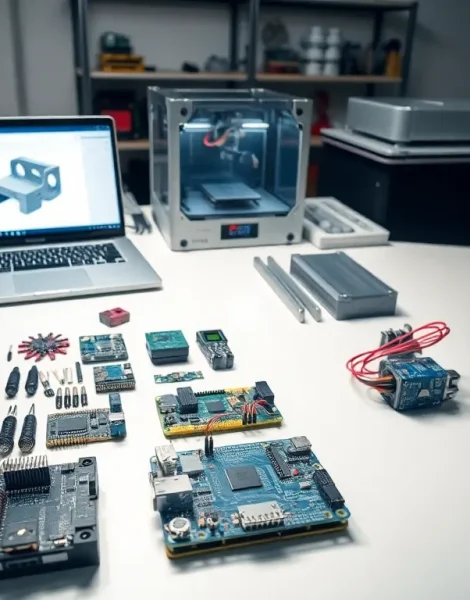
Robotics tools form the foundation of every successful robot project. Whether someone is building their first line-following bot or designing an advanced autonomous system, the right equipment makes all the difference. From hardware essentials like soldering irons and microcontrollers to software platforms that bring machines to life, these tools determine how quickly a project moves from concept to reality.
This guide covers the essential robotics tools every builder needs. It breaks down hardware, software, sensors, and selection criteria so readers can make informed decisions for their next project.
Table of Contents
ToggleKey Takeaways
- Robotics tools span hardware essentials (soldering irons, 3D printers, microcontrollers), software platforms (Arduino IDE, ROS, Python), and sensors that bring robots to life.
- Arduino boards suit beginners with simple programming, while Raspberry Pi and ESP32 handle advanced applications like computer vision and wireless connectivity.
- ROS (Robot Operating System) has become the industry standard for serious robotics development, offering hardware abstraction and simulation testing through Gazebo.
- Sensors like ultrasonic, LiDAR, and IMUs give robots environmental awareness, with affordable options now available for hobbyists.
- Beginners should start with integrated kits and inexpensive robotics tools, then upgrade to specialized equipment like oscilloscopes and 3D printers as skills develop.
- Open-source designs and overseas suppliers can reduce component costs by 50-80%, making robotics projects more accessible on any budget.
Hardware Tools for Robot Construction
Building a robot requires a solid collection of hardware tools. These physical instruments help assemble frames, connect wires, and create functional mechanical systems.
Hand Tools and Power Equipment
Every robotics workspace needs basic hand tools. Screwdrivers (both Phillips and flathead), hex keys, and precision pliers handle most assembly tasks. Wire strippers and crimping tools prepare electrical connections. A good soldering iron, preferably temperature-controlled, joins electronic components permanently.
Power tools speed up construction. Rotary tools cut plastic and metal with precision. Drill presses create accurate holes in chassis materials. 3D printers have become essential robotics tools for creating custom brackets, housings, and mechanical parts.
Microcontrollers and Development Boards
Microcontrollers serve as the brain of most robots. Arduino boards remain popular for beginners due to their simple programming interface and extensive documentation. Raspberry Pi offers more processing power and runs full operating systems, making it suitable for computer vision and AI applications.
ESP32 boards add WiFi and Bluetooth connectivity at low cost. Teensy boards provide high-speed processing for demanding real-time applications. Each platform has strengths, choosing the right one depends on project requirements.
Structural Materials and Fasteners
Robot frames need sturdy materials. Aluminum extrusion systems like 80/20 or OpenBuilds allow modular construction. Acrylic sheets cut easily and work well for lighter builds. Carbon fiber offers excellent strength-to-weight ratios for competition robots.
A variety of fasteners keeps everything together. M3 and M4 metric screws handle most robotics applications. Lock nuts prevent vibration loosening. Standoffs create space between circuit boards and mounting surfaces.
Software and Programming Platforms
Software robotics tools translate human instructions into machine actions. These platforms range from beginner-friendly visual programming to professional-grade development environments.
Arduino IDE and Python
The Arduino IDE provides an accessible entry point for programming microcontrollers. Its C/C++ based language handles motor control, sensor reading, and basic logic. Thousands of libraries extend functionality without requiring users to write code from scratch.
Python dominates higher-level robotics programming. Libraries like NumPy and OpenCV handle complex calculations and image processing. MicroPython brings Python directly to microcontrollers, bridging the gap between simple and advanced projects.
Robot Operating System (ROS)
ROS has become the industry standard for serious robotics development. This middleware framework provides tools for hardware abstraction, device drivers, and inter-process communication. ROS 2 improves real-time performance and security over its predecessor.
Gazebo simulation software integrates with ROS, allowing developers to test code before deploying to physical hardware. This saves time and prevents damage to expensive components during development.
CAD and Design Software
Computer-aided design software helps plan robot structures before cutting any material. Fusion 360 offers free licenses for hobbyists and includes CAM capabilities for CNC machining. OnShape runs entirely in web browsers, enabling collaboration without software installation.
For circuit design, KiCad provides professional-grade PCB layout tools at no cost. Fritzing simplifies breadboard documentation for sharing projects with others.
Sensors and Electronic Components
Sensors give robots awareness of their environment. Electronic components process this information and drive actuators. These robotics tools transform machines from static objects into responsive systems.
Distance and Proximity Sensors
Ultrasonic sensors measure distance using sound waves. The HC-SR04 costs under five dollars and detects objects up to four meters away. Infrared sensors work at shorter ranges but respond faster, making them ideal for obstacle avoidance.
LiDAR sensors create detailed 2D or 3D maps of surroundings. Once prohibitively expensive, units like the RPLidar A1 now cost around $100. Time-of-flight sensors offer millimeter accuracy for precision positioning tasks.
Motion and Orientation Sensors
Inertial measurement units (IMUs) track acceleration and rotation. The MPU-6050 combines a three-axis accelerometer and gyroscope in one chip. Adding a magnetometer creates a complete orientation system for navigation.
Encoders attached to motors measure rotation precisely. Optical encoders count pulses as wheels turn. This feedback enables closed-loop control for accurate movement.
Power and Motor Systems
Motors convert electrical energy into mechanical motion. DC motors offer simple speed control. Stepper motors move in precise increments. Servo motors include built-in position feedback.
Motor drivers amplify control signals to handle higher currents. The L298N handles two DC motors simultaneously. For larger motors, industrial drivers with current sensing protect against overloads.
Batteries power mobile robots. Lithium polymer (LiPo) packs offer high energy density. Proper charging equipment and voltage monitoring prevent dangerous failures.
Choosing the Right Tools for Your Project
Selecting appropriate robotics tools requires matching equipment to specific goals. Budget, skill level, and project scope all influence these decisions.
Beginner Recommendations
New builders benefit from integrated kits. Arduino starter kits include breadboards, jumper wires, LEDs, and basic sensors, everything needed to learn fundamentals. Robot chassis kits with motors and wheels eliminate mechanical design challenges while teaching programming.
Start with inexpensive tools and upgrade as skills develop. A $30 soldering iron works fine for learning. Invest in quality equipment after understanding what features matter most.
Intermediate and Advanced Setups
Experienced builders require specialized robotics tools. Oscilloscopes help debug timing issues. Logic analyzers decode communication protocols. Bench power supplies with current limiting protect circuits during testing.
3D printers become essential at this level. Even budget machines produce usable parts. Resin printers create detailed components when resolution matters.
Budget Considerations
Open-source designs reduce costs significantly. Clone Arduino boards cost a fraction of originals while offering identical functionality. Community-designed sensor modules often outperform branded alternatives.
Buying components from overseas suppliers saves money on larger orders. Shipping takes longer, but prices drop by 50-80% compared to domestic retailers. Plan projects ahead to accommodate delivery times.


